
Free to study. Every lesson and assessment is free. Paid certificates are not on sale yet.

Cyber security basics: free online awareness course for New Zealand workers

Everyday cyber security for people who are not IT staff: passwords, two-step verification, updates, devices, Wi-Fi, file sharing, backups, AI tools and reporting.

  • About 36 min
  • 5 short modules
  • 15 questions
  • 80% to pass
A hand typing on a work laptop, with a second laptop open beside it.

About this course

A password on a sticky note. A phone left on a bus. A roster pasted into a chatbot. Most cyber security at work comes down to small daily habits, and you do not need to be technical or have an IT department to get them right. This course covers those habits in plain language, using guidance from New Zealand's National Cyber Security Centre.

You can study and sit the assessment free, with no account. Own Your Online also offers free guides and assessment tools, linked on this page, and you may prefer them. Pay only if you pass and want our certificate.

What you will learn

  • Create long, unique passwords or passphrases and explain how a password manager helps
  • Turn on two-step verification and respond to a login code you did not ask for
  • Keep work phones and laptops updated, locked and looked after
  • Make safer choices about shared devices, personal devices and public Wi-Fi
  • Share files carefully, protect backups and keep work or client information out of public AI tools
  • Report a lost device or suspected compromise straight away

Who this course is for

  • Office and reception staff who use email, shared drives and online accounts
  • CafĂ©, bar and hotel workers who use shared tablets, tills and booking systems
  • Early childhood workers who use centre tablets, apps and phones
  • Team leaders in small workplaces with no IT department

How the course works

  1. 1. Passwords and two-step verificationHow accounts get broken into, why long and unique passwords work, what a password manager does, and how to turn on a second check.About 6 min, ending with a quick check
  2. 2. Updates and looking after your devicesWhy updates matter, what to do about older devices, and how to lock and protect a phone, tablet or laptop.About 5 min, ending with a quick check
  3. 3. Shared devices, personal devices and public Wi-FiLogins on shared devices, asking before you use your own phone or laptop, and which connection to use where.About 5 min, ending with a quick check
  4. 4. Sharing files, backups and public AI toolsHow to share with the least access, what makes a backup useful, and why personal information stays out of public AI tools.About 5 min, ending with a quick check
  5. 5. Lost devices and suspected compromisesWhat to do first when a device goes missing or an account looks wrong, and who to tell.About 5 min, ending with a quick check
  6. Sit the assessment15 questions drawn at random. You need 80% to pass, and there is no time limit. If you do not pass, you will see which topics to review, then try again with a new set of questions.Free, and so are retries
  7. If you pass, the certificate is your choiceYou pay once, then get the PDF straight away and a copy by email. Your place is saved on this device the whole way, with no sign-up.NZ$24.90, optional
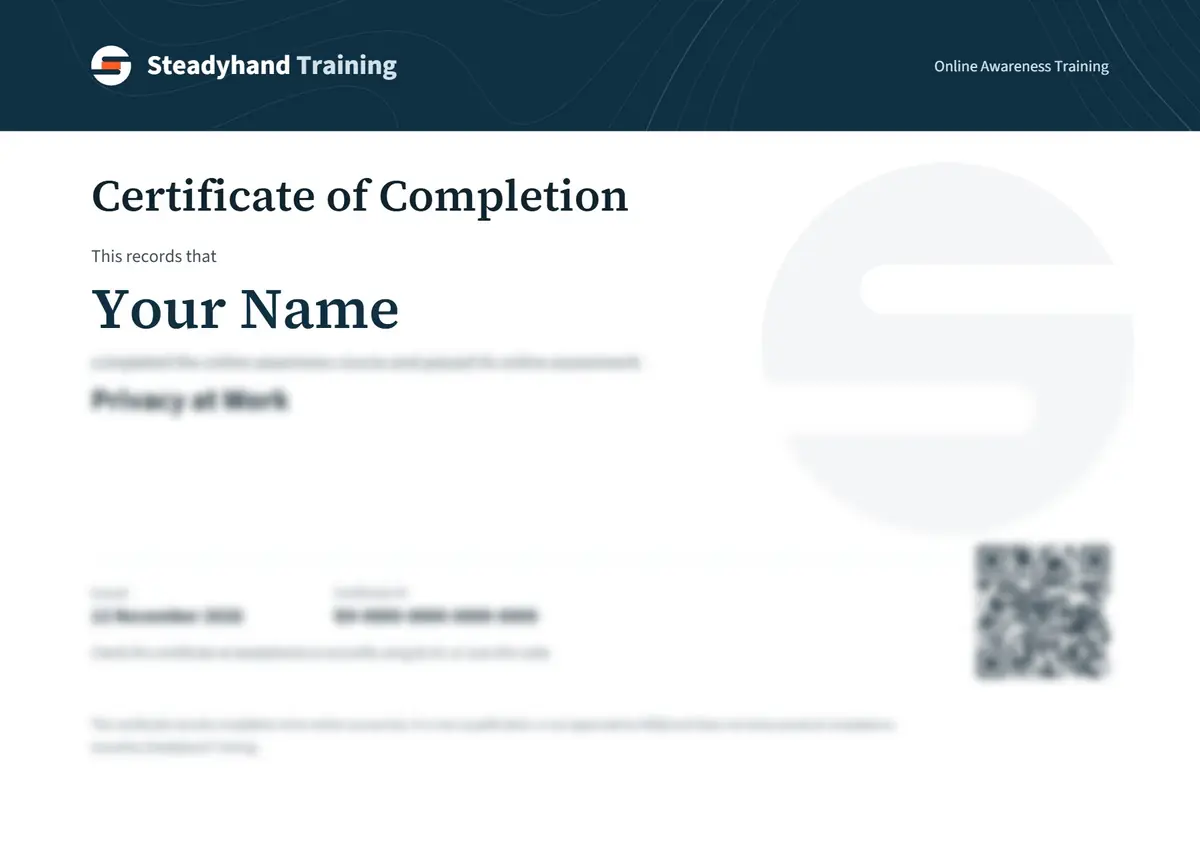
A sample Steadyhand Training certificate of completion made out to Your Name, with its details blurred.
Sample. Yours shows your name, the course, the date and an ID anyone can check.

What this certificate does and does not show

  • This is general awareness for people who use technology at work. It is not IT or security advice for your particular systems, and it does not make your workplace secure.
  • It does not teach you to fix a hacked system or an infected device. For that, go to your IT provider, or report to the National Cyber Security Centre for advice.
  • Your workplace's rules come first. If they differ from this course, follow them and ask your manager.
  • Spotting scam messages is covered in a separate course, Spotting Scams and Phishing at Work.

If you go straight to the assessment without completing the modules, your certificate is titled Certificate of Knowledge Assessment, because that is what it records.

Anyone can check a certificate on our verification page using its ID or QR code. More about the certificate.

Questions about this course

We have no IT department. Who do I ask?

Start with your manager or the owner, and find out who set up your email and router. Own Your Online has free guides and an assessment tool for small businesses. If something has gone wrong, NCSC's reporting tool is open to small to medium businesses, with a free phone line for help using it.

Can I use my own phone for work?

That depends on your workplace, so ask first. If it is allowed, keep the phone updated, use a strong passcode and do not hand it to others while work accounts are open. The third lesson covers this.

Is it OK to use AI tools at work?

Ask what your workplace allows. Whatever the answer, keep personal information out of public tools and check everything they write. The fourth lesson explains why.

How is this different from Own Your Online?

Own Your Online is run by NCSC, and its guides go into more detail on each topic. This course puts the everyday basics in one place, adds questions to test yourself and offers an optional paid certificate if you pass and want one. Use whichever suits you.

Will this make my workplace secure?

No. It covers what one worker can do day to day. Your workplace's systems, settings and rules still need someone to look after them, such as the owner or an IT provider.

Will my employer accept the certificate?

Ask them first. Each employer decides what training it accepts. This is awareness training, not a qualification. The optional paid certificate shows that you passed this assessment, and anyone can check it on our verification page.

Official sources behind this course

The lessons are original summaries of these sources. For your own situation, the source is what counts.

Show all 47 sources

Version 1.0.0, last checked 2026-11-03. Approved for publication by our editor on 2026-11-09. Not reviewed by an external professional. How we check our content.

Related courses

Office, privacy and cyber security

Spotting Scams and Phishing at Work

How scams reach workers, how to check a message, payment or call by another channel, and what to do straight after a mistake, without shame.

  • 38 min
  • 5 modules

Free to study

Certificate NZ$24.90 if you pass

Office, privacy and cyber security

Privacy at Work

What the Privacy Act 2020 means in everyday work: collecting, protecting, sharing and disposing of information, and what to do after a mistake.

  • 35 min
  • 5 modules

Free to study

Certificate NZ$24.90 if you pass
Employment, leadership and communication

Record Keeping at Work

How to write factual, timely notes, correct mistakes honestly, handle incident and complaint records, and understand who may read records and how long they are kept.

  • 37 min
  • 5 modules

Free to study

Certificate NZ$24.90 if you pass

Passed 2 or more courses? Buy their certificates together and pay 20% less.

Need help before you start?

Write to support@steadyhand.co.nz and a person will answer. Who runs this site.

Free to study.
Certificate NZ$24.90 if you pass.